
How to Fix a Vacuum Cleaner: DIY Solutions That Actually Work

- How To Clean A Shark Vacuum And Filters
- Easy Ways to Polish Laminate Floors
- How to Remove Pet Hair From Clothing
But don't worry just yet. The longevity of an average vacuum cleaner can stretch from 10 to 20 years. However, owners have a tendency to get rid of their vacuum cleaner before its "expiration date" because 1) it broke down due to improper use or lack of maintenance or 2) a top-rated vacuum cleaner sounds sexier with a hundred more functionalities (a little exaggeration won't hurt, right?).
If you are someone who cherishes your things and does not like to spend money on unnecessary purchases, then you've come to the right place.
In this article, I will walk you through some common symptoms, diagnosis, and vacuum cleaner troubleshooting steps, showing you exactly how to fix a vacuum cleaner using simple DIY methods.

The vacuum has long since evolved into a necessary tool for daily living
Quick Troubleshooting Checklist
Prior to making extensive repairs, attempt these easy remedies:
- Check if it's properly plugged in
- Test the power outlet with another device
- Empty the dust bag or canister if full
- Look for obvious clogs in hoses or brushes
- Verify you're using the right height setting
My Vacuum Stopped Working!
You are in the middle of your weekly cleaning chore and suddenly, your vacuum won't turn on or it won't suck up any bread crumbs from last night's dinner.
What starts as confusion quickly turns into frustration after many failed attempts to make the vacuum start working again.
Don't jump to the conclusion that you're dealing with a broken vacuum. Stop for a moment, take a deep breath, and ask yourself this:
"Did the vacuum actually cease operating, or was it just me?"
➜ RELATED: 50 Cleaning Tips & Tricks to Make Your Home Shine
Locate the Problem - Double Checking
First, check if your vacuum is correctly plugged in.

First and foremost, make sure your vacuum is plugged in correctly
If yes, but the vacuum remains at a standstill, double check the electrical socket with another device to see if the power is working.
If your vacuum is properly plugged in but starts and stops randomly, then the plug might be at fault. Fix or replace the plug as soon as possible as the vacuum cleaner working on an unstable power source can be a real hazard.
Problem #1: Vacuum Does Not Pick Up, Loses Suction
A vacuum with no suction surely agitates the biggest number of people. If the motor is running (judging from the sound) but not picking up any debris, then inspect the following: nozzles, filters, hoses, dirt bag, and blower wheel.
Most of the time, a vacuum loses its suction when the roller stops working or the hoses or filters are clogged. Do a quick check for causes of clogging and simple remedies as follows:
Turn the vacuum upside down to look for any sign of impediment (large volume of hair, large debris, etc.) in the rollers.
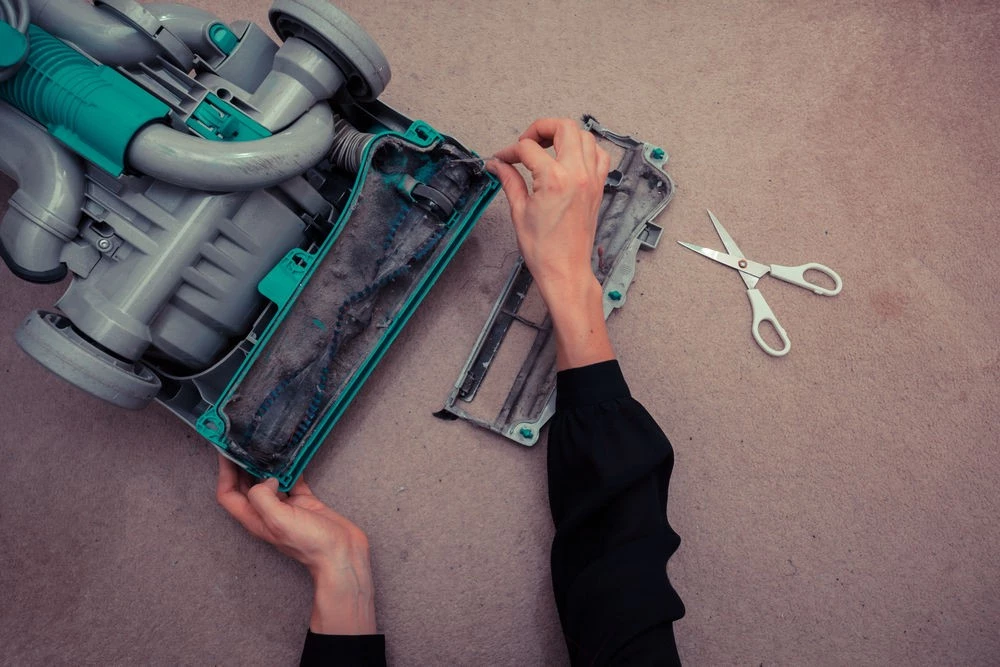
To check for any indication of an obstruction, turn the vacuum upside down
Unclog the rollers: first, use your hands to pick out hair or large debris and put it in a dirt bin that you keep nearby. Use a pair of scissors to snip through any hairs that stubbornly stick to the rollers. Carry out every cut deliberately as you do not want to cut the bristles that eventually cost you a visit to the vacuum cleaner repair shop.
Make sure that the hoses and nozzles are free of obstruction. Tangled hoses and detached nozzles can be too minor to be noticed but sometimes can leave you with what appears to be a broken vacuum.
Examine the hoses: unscrew the hose from the machine, lay it out straight on an even surface. Shine a bright flashlight into one end of the hose and place your eye on the opposite end. If the light is not quite visible through the hose, it means the hose is clogged or obstructed.
Disassemble your vacuum and look through every filter to see if they are clogged or not. Air filters work to trap particles as air travels through the vacuum so being clogged will significantly hinder suction ability.
Check the dust bag. The vacuum is unable to pick up any debris with a 'full stomach' so empty or replace it with a new one, depending on what type of vacuum you are using.
Problem #2: Vacuum is Blowing Dusty Air Out the Back
This symptom has the same causes as the previous one. Usually when your vacuum cleaner starts discharging air and debris out from the bag, it also stops picking up debris. It is simply because the bag or canister is full.
If your vacuum starts blowing hot air, which is accompanied by an unpleasant smell, take a look at the collection bag.
Normally, there is limit fill line on the front of a bagless vacuum, and on the bag of a canister or upright vacuum. Fixing a vacuum when the collected dirt amounts to the fill line is as easy as either removing the collection bin or replacing the dirt bag with a new one.
Problem #3: You Are in the Wrong Mode!
Or in other words: "there's nothing wrong with your vacuum at all!"
Usually, the vacuum needs to be adjusted at a suitable height in order to achieve optimal results. So if your vacuum does not seem to pick up anything off the floor even if the roller is running smoothly, it may be on the wrong setting for the type of floor you're working on.

To put it another way, "there's nothing wrong with your vacuum at all!"
The different levels of height can be determined by words such as "deep pile, medium pile, short pile, bare floor" or by numbers from 1 to 5 (depending on the type and brand of vacuum). The thinner your carpet, the closer the vacuum should be lowered.
"Bare floor" is the lowest your vacuum can go, and it is for any tile, wood, or other hard flooring because it will seal the vacuum to your floor and perform the most powerful suction.
Therefore, if your vacuum does not suck up any debris or bread crumbs off the floor, don't rush to the vacuum machine repair shop just yet.
Keep calm and figure out whether it's on the right setting or not.
If it's on the right setting but still not working, then look for the next signs.
➜ RELATED: How To Clean Wooden Floors With Ease, In The Right Way
Problem #4: My Vacuum Smells Like Burnt Rubber!
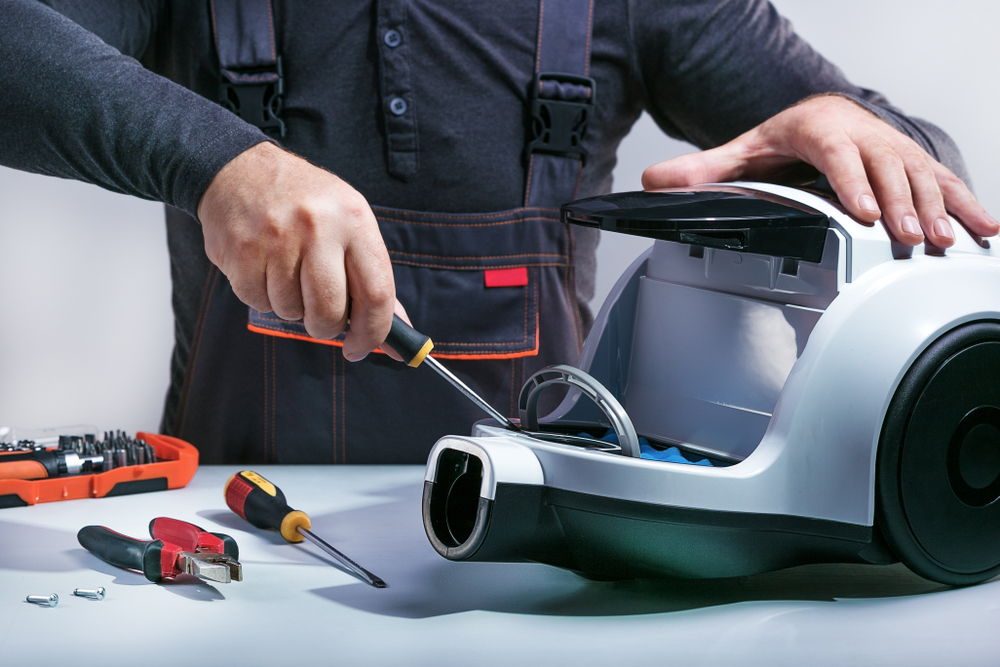

First things first: unplug the power supply
First things first: disconnect the power cord.
Vacuum cleaners consist of multiple components that work together to provide suction to remove dirt, debris, dust, and everything in between. There is a belt located in the bottom plate, which is connected to the motor together with the roller bush. It works to guide the debris up the hose and into the dirt canister.
A burning smell develops as a result of a component malfunctioning. Most of the parts are made from industrial materials such as rubber or plastic, which explains the strong smell that is coming out of your vacuum cleaner.
Check the Belt
When your vacuum gives off a burning smell, do a quick check to find the cause. Normally, I would do a bottom-up check, starting with the belt.
Flip your vacuum over and use a screwdriver to remove the bottom plate and look for the belt.
The type of suction your vacuum cleaner operates on will dictate the location of the belt, which is either on the side or in the middle. If yours is side suction, the belt will be positioned on the side opposite of the hose attachment place. If your vacuum runs on central suction units, the belt can be found in the middle of the bottom plate.
Take the belt off by unlooping it from the metal spindle and the roller brush. Some vacuum models will require removing the roller brush in order to locate the belt.
Check if there is any string, hair, or carpet fiber that is obstructing the movement of the belt. Pull them all out, then clean or replace the belt.
If your vacuum cleaner has a rubber belt, it is best to replace it once a year for optimal performance. If yours is a metal belt and runs on a gear assembly, replace it after a period of time recommended by the manufacturer.
Learning how to fix a vacuum cleaner yourself can save you both time and money on these common maintenance tasks.
➟ RELATED: How To Install Carpet: Pro-Guide From Start To Finish

You may save time and money on these routine maintenance chores by learning how to fix a vacuum cleaner yourself
Roller Brush May Be Broken
After cleaning the belt, go ahead and examine the condition of the roller brush. Sometimes it can be broken in half or stop rolling due to overuse or improper vacuuming, which can also result in emitting a burnt odor.
If the roller brush is in abnormal condition and you do not know how to repair vacuum cleaner components like this yourself, I suggest you have it inspected by an authorized service center.
➟ Picked For You: How To Clean Dyson Vacuum Cleaners In Easy Steps
Motor Malfunctioning
When you spot no problems with the belt or the roller brush and the vacuum continues giving off a burnt rubber smell, then a faulty motor could be the reason. In such case, there is nothing much you can do but to bring it to a service center (unless you are a mechanic who knows how to repair vacuum cleaners with no difficulty).
Debris Clog
If you are vacuuming over a large object or an area rug and something gets stuck between the brush roller and the belt, the burning rubber smell can come as a result. To fix the problem, simply pull the rug or object out of the machine.

Just remove the rug or object from the machine to resolve the issue
Simple Prevention Tips
Keep your vacuum healthy with these easy habits:
- Empty the dirt bin weekly or after each use
- Clean the belt and roller brush regularly
- Replace filters as recommended
- Use the correct height settings for different floors
Final Takeaways
I have summarized some of the more commonly encountered problems with vacuum cleaners. Even though there is a limit to what you can do when your vacuum cleaner is 'under the weather' you can always help to keep it healthy by emptying the dirt bin once a week or after each use (to avoid the unpleasant smell), often clean the belt and roller brush, and free them from any kind of clog.
Most people find that repairing vacuum cleaners for basic issues is much easier than expected, and knowing how to fix a vacuum cleaner properly can extend its lifespan significantly.
Hope these help!
FREQUENTLY ASKED QUESTIONS
- 01. Why Won't My Vacuum Turn on Even When It's Plugged in?
-
Check if the outlet is working by testing it with another device. If the outlet works fine, the issue might be a faulty power cord or internal electrical problem that requires professional repair.
- 02. What Should I Do First When My Vacuum Loses Suction?
-
Start by emptying the dust bag or canister, then check for clogs in the hose and clean or replace the filters. The most frequent reasons for suction loss are these.
- 03. Is It Normal for My Vacuum to Smell When I Use It?
-
A musty smell from a full bag is normal, but a burning rubber smell means you should stop using it immediately and check the belt and roller brush for problems.
- 04. How Do I Know if I'm Using the Right Height Setting?
-
If your vacuum isn't picking up debris despite running normally, try adjusting the height. Use "bare floor" for hard surfaces and higher settings for thicker carpets.


